Control of the rov is handled by a microcontroller. This allows for more precise control, greater functionality and ease of use over relays and switches.
Some of the features currently built into the controller include:
1. Fully proportional, bidirectional control of all three motors
2. Mixing of horizontal thruster power so that left/right/forward/reverse is controlled by one thumb stick
3. Adjustable hover trim with one button enable/disable toggle
4. Yaw control with adjustable trim
5. Low and high speed range select
6. Low voltage warning and cut off (very important for Lipos)
7. Fault detection
8. Status indicator
The controller for the ROVer is based on an Arduino clone called the Boarduino:
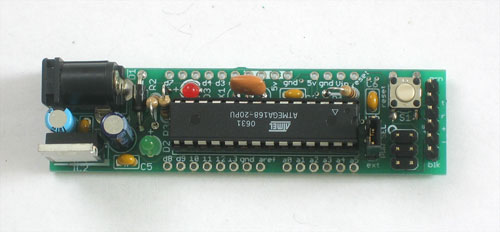 http://www.ladyada.net/make/boarduino/index.html
The arduino is an open source microcontroller development system. It is fairly inexpensive, pretty powerful and very well supported. You can make almost anything you can imagine with an arduino.
Arduino info:
http://arduino.cc/
I chose the boarduino because I happened to have one lying around from a previous project that was no longer in use. Also, the form factor is a little easier to work with due to the pin spacing. It fits perfectly in the motherboard I built for it based on a standard radio shack PC board. The code will run correctly on any official or unofficial arduino clone without any changes.
 http://www.radioshack.com/product/index ... d=2102845#
The motherboard has all of the support components (power supply, resistors, etc.) and the connectors for the motor controllers and Wii controller.


There are two motor controller modules, a single for the vertical thruster and a dual for the horizontal thrusters. Each motor controller has a 16V max and a 9 A continuous current rating with a peak current rating of 30 A. They also have fault detection and a couple of other cute features. At the currents I am drawing, it doesn't need a heatsink, however I already had one installed on the single motor driver (left over from an older project). I probably won't bother installing them on the other two.
Single motor controller:
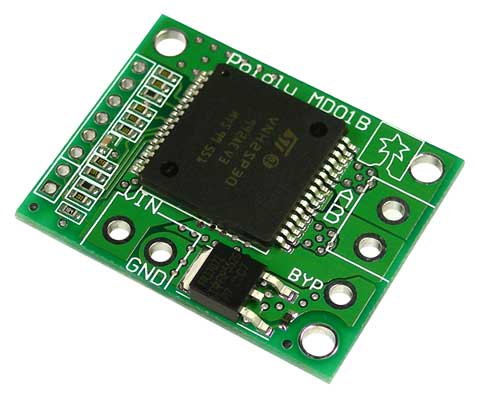 http://www.pololu.com/catalog/product/705
Dual motor controller:
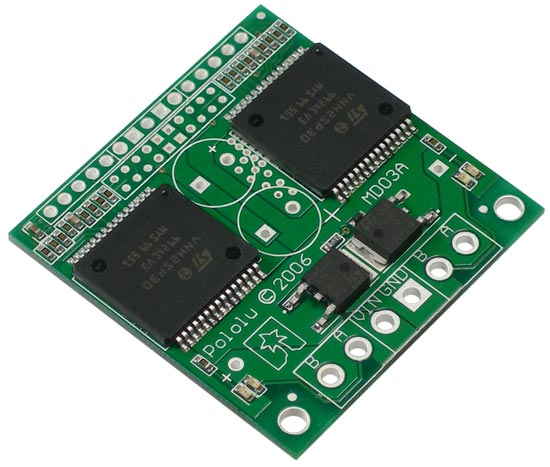 http://www.pololu.com/catalog/product/707
The user interface for the rov is a wireless Wii classic controller called the Wing from Nyko:
 http://www.amazon.com/Wing-Wireless-Con ... 744&sr=8-1
The Wing has a little receiver that normally plugs into the Wiimote. It is the little white box in the picture above. In my application, it is connected to the arduino. Initially I started with the wired Wii classic controller pro, but the short cable caused issues with seeing the rov and the kids were always tripping over it. The wireless version eliminates these issues. It has a stated range of 10', but I have used it more than 20' from the receiver without issue. I can walk anywhere around the pool and still control the rov. The only negative about this controller is the buttons have a very mushy feel to them. The wired controller has much better buttons along with a slightly better position for the shoulder buttons.
There is a arduino library for wired controller that makes using the Wii classic controller a snap, however it doesn't work with the wireless one. It took quite a bit of reverse engineering and googling to get it working.
The right stick controls the forward/backwards/left/right movement of the rov. The mixing of the left and right thruster power levels is calculated by the arduino. For example, if you push the stick all the way up, then both motors spin forwards at full power. For full left, the left thruster spins backwards at 100% and the right spins forwards at 100%, and so on.
At full speed, the rov is pretty fast so to make the rov easier for the kids to drive it has two speed ranges: low and high. Low speed limits the power to 50% with high speed allowing 100% power. Only the horizontal thrusters have the low and high speed. By default, the rov is in low speed mode. High speed mode is enabled by holding down the right shoulder button.
The left stick on the controller controls the vertical thruster. Pushing the stick up causes the rov to rise in the water. Pushing the stick down causes it to descend. The rov can be set to hover at any depth by pressing the up and down directional pad buttons. Basically you press the down button until the rov stops rising. The left shoulder button enables and disables the hover. This is handy when you come to the surface to retrieve the toys and don't want the vertical thruster spinning. You hit the button to shut it off, get out the toys, stick it back in the water and hit the button again to turn it back on. It remembers the last setting so you don't need to readjust it. Perfect buoyancy at the touch of a button!
The only downside to having a single vertical thruster is the rov will spin (yaw) when the thruster is moving. A gyro would easily solve this issue, but I don't want to install one on the rov. Therefore I have tried to emulate a gyro in software with what I call yaw control. The arduino knows the speed and direction of the vertical thruster, so it can apply a counter-acting yaw command to the horizontal thrusters. That is the theory, anyway.
I tried a few different ideas for correcting the yaw. The first involved multiplying an adjustable gain to the vertical motor power to come up with the left and right correction powers. This didn't work real well and also revealed another problem: the direction of the unwanted yaw was dependent on the direction of the vertical thruster (duh!). My next idea (which I never actually implemented completely) was a look up table with different corrections stored for a fraction of the vertical powers. This would probably provide the best correction, especially if the yaw is non-linear.
The final approach that I tried was I simply assumed that yaw was linear. I determined the amount of correction needed for full up power and full down power and use these as limits. The vertical motor power is scaled to come up with the correction. This technique worked well enough that I have stuck with it. The yaw is definitely not linear, but the deviation is pretty small and not worth implementing the look up table to correct. The other observation I made is the props I have used generate more thrust in one direction than the other.
In order to help determine the amount of correction, I modified the arduino code to print out the motor powers when I pressed a specific button. This allowed me to log the correction needed for full up power and full down power. The left and right direction buttons control the limits of the yaw control used for the scaling which allows for fine tuning while the rov is in use.
The home button on the controller resets the settings and stick center positions. This is handy if you get the trims way out of whack. The rest of the buttons are currently unused.
The electronics are housed in a clear, waterproof food enclosure.
 http://www.bedbathandbeyond.com/product ... 75&RN=204&
Overhead view:

The Li-Po battery is the blue rectangle at the bottom. There is a lighted power switch on the left side of the box and a fuse holder (slightly obscured) above the battery. The arduino is in the center, the dual motor controller is on the left of the arduino and the single motor controller is on the right. The tether connector is the right side of the box. The Wing receiver is the white square attached to the side of the box at top of the picture.
The arduino and the motor controller assemblies sit on a foam cradle:

Switch side:

Tether connector side:

Cover on and ready to go!